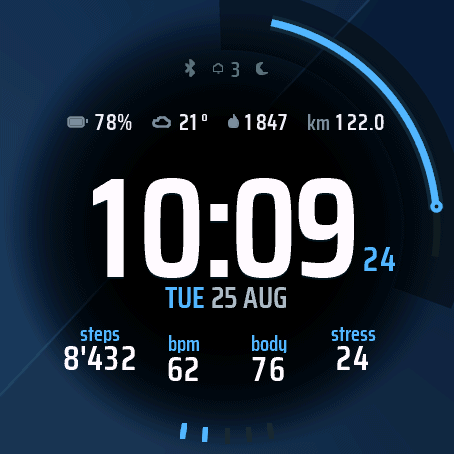
Umbra
Watch face · eight data fields, three designs
An independent studio in Switzerland. Every watch face is drawn for each display size, worn on the wrist before release and maintained after it.
Umbra is free in the store and has had 18 updates since launch. The second watch face is analog, in the design phase, and will be paid.
Watch face · eight data fields, three designs
Watch face · analog, sweeping seconds hand
glyphlabs is an independent studio in Switzerland. Umbra is the first app, Analog is next.
Backgrounds and typefaces are made for each of the four resolutions, not scaled.
Testing happens on the wrist on a Forerunner 570, the other sizes run in Garmin's simulator.
If a face lights up too much of the display in always-on, the watch turns it off, so every view is measured against that limit per resolution. How the rule works.
No account, and nothing about you sits with glyphlabs: heart rate, stress and Body Battery are read by the watch and shown there.
Umbra has had 18 updates since launch. What changed in each version is in the changelog.
Updates arrive through the Connect IQ Store and keep your settings.
What the platform enforces, what a watch face costs in battery, and which free faces in the store are worth installing.
Garmin lets a watch face stay lit in always-on mode only under three rules. Here is what they are, what changed with API 5.0.0, and what they do to a design.
Some do, some do not, and the price tag tells you nothing. What actually costs power on a Garmin watch face, and how to judge one before you install it.
Five free Connect IQ faces without a code, with always-on and data you choose: Segment34 MkIII and MkII, Simply Large AMOLED, Dilamor Modular Lite, Clear and Simple 36.
The Connect IQ free filter takes a listing at its word. Four things to check in the description so you do not end up with a watermark on your wrist.